Objective:
By the end of this lesson, you’ll be able to set up an automated SMS lead capture system that instantly responds to inbound messages and integrates leads into your workflow.
From setting up keyword triggers, automating follow-ups, and seamlessly integrating leads into your workflow. Perfect for loan officers and realtors looking to streamline lead generation and close more deals—fast. ⚡🥷
Step 1: Create a New Workflow
1. Navigate to Marketing > Workflows
2. Click Create New Workflow
3. Select Start from Scratch
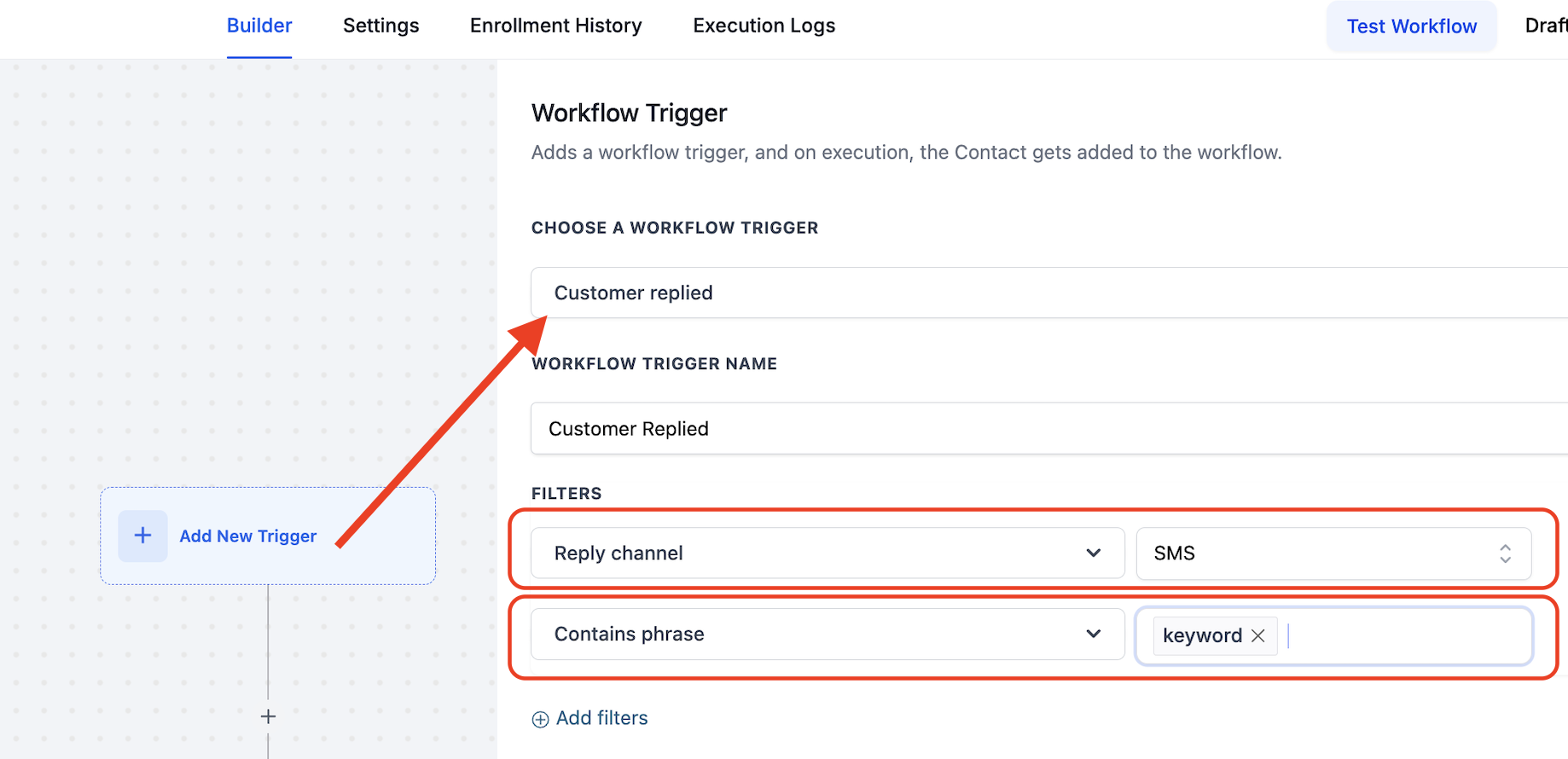
Step 2: Set Up the SMS Trigger
1. Add a Trigger: Customer Replied
2. Click Filter by “Reply Channel” and select SMS
3. Add another filter: “Contains phrase” and enter a keyword (e.g., “Free” or any custom word you choose)
Step 3: Define Actions & Save
1. Choose your actions (e.g., send an auto-reply, assign to a pipeline, notify a team member, etc.)
2. Click Publish and then Save
Best Practices:
• Use clear keywords to trigger responses effectively
• Ensure responses provide value (e.g., a lead magnet, appointment link, or next steps)
• Test the workflow with your own number before going live
1. VIP Open House Lead Capture
🔹 Trigger: “VIP Access”
🔹 Goal: Capture high-intent buyers at an open house and create urgency.
Flow: Prospects see the open house post and then text “VIP Access” to receive an exclusive sign-up link and tour. They can then fill out a form with their contact details, pre-approval status, and buying timeline. This triggers an automated confirmation email and SMS, alerts the realtor, and prompts the loan officer to follow up.
✅ Why It Works:
• Realtors receive serious buyer leads.
• Loan officers get pre-approval opportunities.
• VIP positioning increases engagement and conversions.
2. Instant Home Value Alert (Seller Leads)
🔹 Trigger: “Home Value”
🔹 Goal: Generate seller leads while capturing refinance and new purchase opportunities.
Flow: Homeowners text “Home Value” to get an instant estimate. They complete a form with their contact details, address, and interest level (selling, refinancing, or just curious). Realtors receive the lead, and loan officers follow up with financing options.
✅ Why It Works:
• Homeowners are naturally curious about their property’s value.
• Realtors get seller leads early in the process.
• Capture refi and purchase prospects before they list.
3. Rate Drop Watchlist
🔹 Trigger: “Rate Drop”
🔹 Goal: Build a pipeline of clients waiting for interest rates to drop.
Text is sent to past clients, asking them to reply if they want to be notified when rates drop. Clients will then text “Rate Drop” to opt-in, then reply with their current interest rate. They’re added to a segmented list, and when rates go below their current rate, you have a list to call.
✅ Why It Works:
• Keeps past clients engaged without being intrusive.
• Creates a list of ready-to-act buyers and refinance prospects.
• Create more realtor referrals.
🔹 Trigger: “PREAPPROVED”
🔹 Goal: Simplify pre-approvals for busy prospects.
Prospects text “PREAPPROVED” to get a link to a short digital form. They fill out basic info, and the LO follows up to start the mortgage process.
✅ Why It Works:
Simple, fast, and convenient for prospects.
Captures essential info to qualify leads quickly.
Minimal setup required with a basic form and follow-up.
Reach out to chat support with any technical questions!
