
Bulk update contact types in just a few clicks, making it easier to organize and segment your contacts. No more one-by-one updates—just quick and efficient changes!
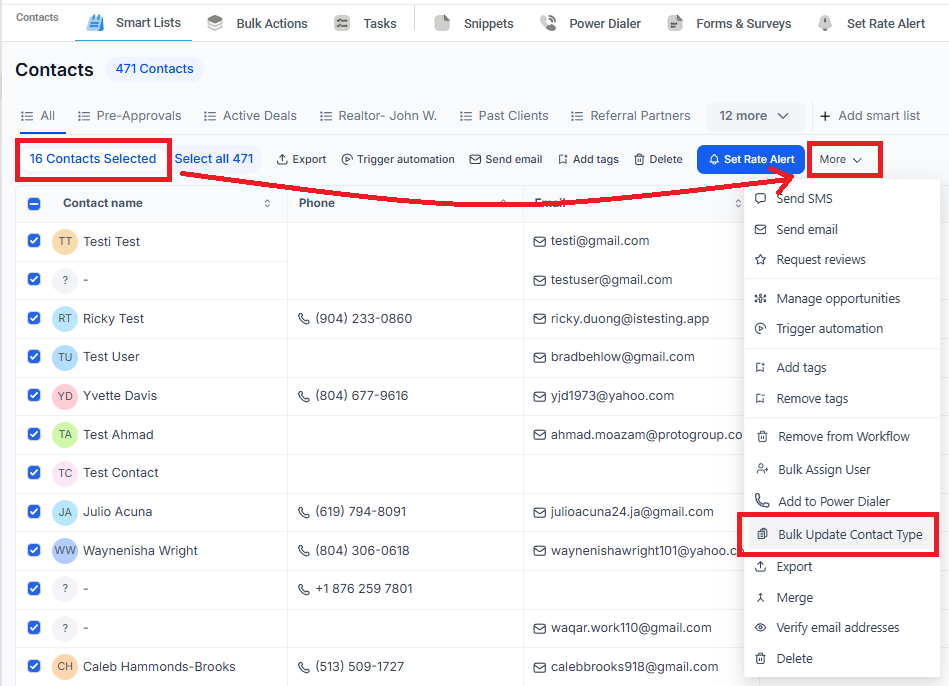
How to Bulk Update Contact Types
Select Contacts – Go to your contacts list and choose multiple contacts at once.
Update Contact Type – Click the bulk action menu and update their contact type in one step.
Save & Done – Your contacts are now updated and easier to manage!
How to Add More Contact Types
Go to Settings > Custom Fields
Search for “Contact Type”
Edit the field to add more contact type options
Save your changes, and you're ready to use them in bulk updates
Why This Saves You Time
Quickly organize contacts without manual updates
Easily segment contacts based on their type
Keep your CRM clean and structured
Now, updating contact types is faster and easier than ever! 🚀