With post-close, the goal is to keep automation simple & effective just like in the beginning.
There are only 2 types of communication at this point:
Short-term needs
Long-term nurture
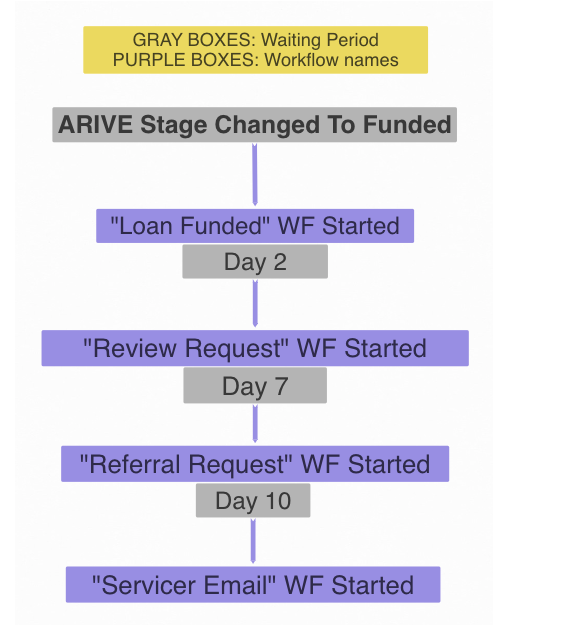
Once the loan is funded, clients are immediately added to the Servicer email, Review Request, and Referral Request workflows, each starting after its own delay.
Over a ten day period after funding, the following will take place:
Borrower will be notified about the funding
Pro-Tip: A personal call or SMS can enhance the client experience and reinforce the relationship.
Review request from borrower
Pro-Tip: Consider a 'Review Gate' or direct them to Google for public testimonials.
Referral request from borrower
Borrower is reminded who their servicer is
Client nurturing will begin & include things like
Loan Anniversary
Happy Birthdays
Happy Holidays
6 Month Reviews
And More!
This is where the magic really happens. Client nurturing after the deal is funded. There's not a silver bullet email, text, or call that you can make to a single past client that will generate a loan. Staying in front of them is key. A simple text once every quarter (just 4 times per year) will go a lot further than you think!
Q: Can I still manually send messages while automations are on?
A: Yes
Q: Can I turn the automations off?
A: Yes
Q: My client received an automated message & I want to stop the campaign, how do I do that?
A: Take a look at the lesson here.
Q: Can I edit these messages?
A: Yes, you will need to find the workflow & edit the individual steps. Take a look at the lesson on how to create & edit workflows here.
Q: How many messages will my prospect receive?
A: Your prospects receive these emails only when you update ARIVE stages.
Early Payoff Date: 60 days prior, an internal reminder to the LO is sent to discuss refinancing options with the client.
