
Application In Process Automations
Now that you have the application, documents, and are about to disclose - here's where LO Ninja comes in!
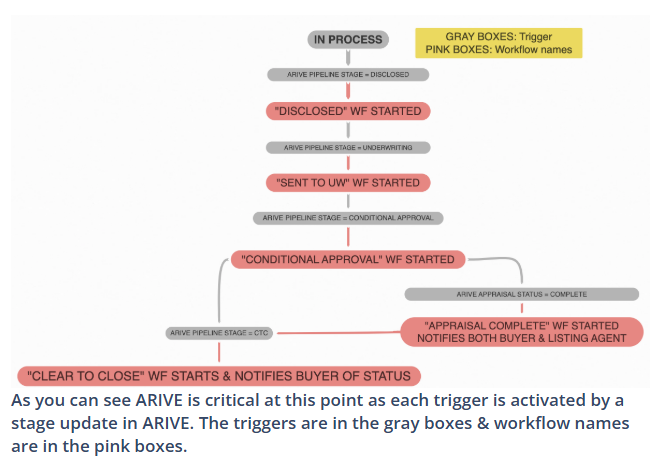
1) Disclosed workflow: alerts the borrower to e-sign their initial disclosures via email.
Pro-Tip: Ensure the primary borrower is aware of what these stages entail and what is expected from them next.
2) Sent To Underwriting workflow: updates only the borrower via email about the status of their loan
3) Conditional Approval workflow: updates only the borrower letting them know about the status of their loan
4) If Applicable: Appraisal Complete workflow: notifies the borrower & both agents
5) Clear To Close workflow: updates the borrower with a celebration email
Q&A
Q: Can I still manually send messages while automations are on?
A: Yes
Q: Can I turn the automations off?
A: Yes
Q: My client received an automated message & I want to stop the campaign, how do I do that?
A: Take a look at the lesson here.
Q: Can I edit these messages?
A: Yes, you will need to find the workflow & edit the individual steps. Take a look at the lesson on how to create & edit workflows here.
Q: How many messages will my prospect receive?
A: Your prospects receive these emails only when you update ARIVE stages.
BONUSES:
Rate Lock Expiration Alerts
Primary Borrower: Receives scheduled reminders 7 days, 3 days, and on the day of rate lock expiration.
Loan Funded - ARIVE Stage Updated Trigger:
Primary Borrower, Co-Borrower, and Realtor: Notified that the loan has funded, marking the beginning of the post-close process.