
New Referral
When you get a referral from an agent, CPA, or any other referral partner you know that person needs to be contacted ASAP! This is how you would add them to the campaign:
1: Find & Select Contact:

2: Enter Referral Source Information

3: Find Automation Dropdown & Add
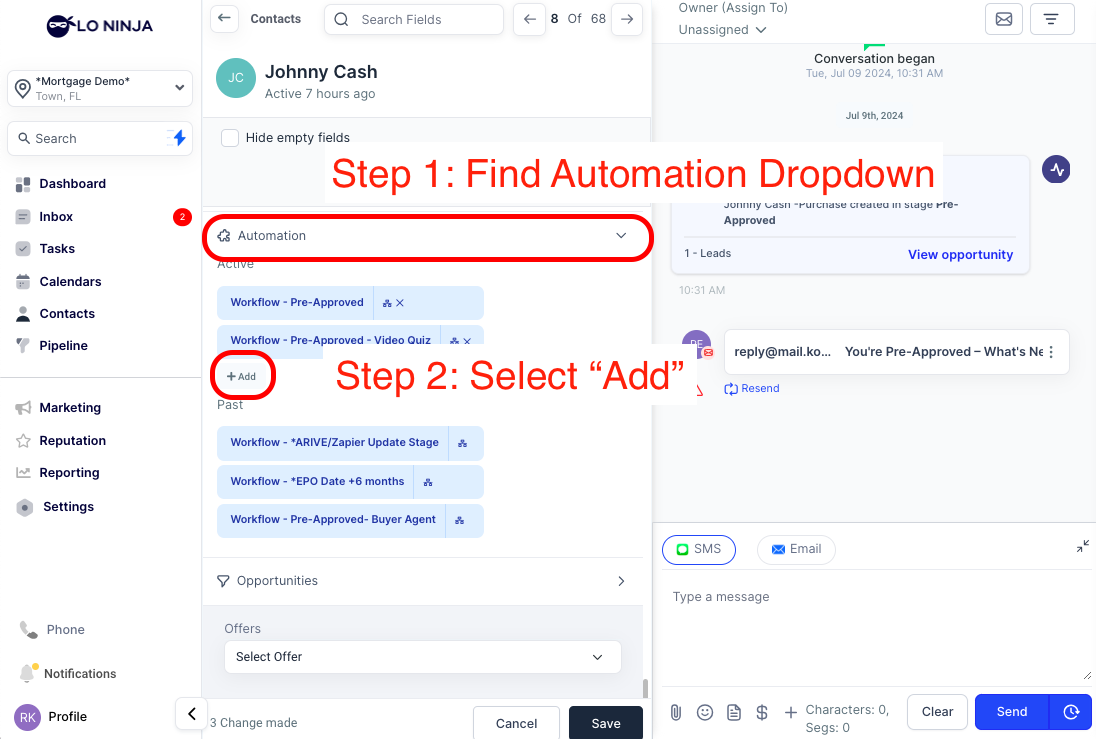
4: Select "New Referral" & Begin Automation
Key Benefits:
• Quick Contact: Prompt outreach increases your chances of success.
• Time-Saving: Less follow-up frees up your time.
• Real-Time Updates: Workflow stops and notifies you when a prospect replies.
• Reduced Manual Tracking: Focus more on high-value tasks.
FAQ
When does this begin?
Check out the tutorial here to understand more.
What communication goes out?
There is a combination of 4 text messages & 2 emails that go out to the buyer & the agent. These include simple & effective follow up or updates to the agent.
How do I stop the messages?
When a prospect replies to the text, the workflow automatically stops.
What do these messages say?
The first message is a soft intro mentioning the referral source & the messages for follow up ask if they've put home buying on hold or if they needed a consultation.