LO Ninja now includes a full set of powerful mortgage calculators. Use them to qualify borrowers faster, walk through complex scenarios, or share smart data to support buyers in real time.
You’ll find all calculators under the Calculators tab in your account.
Show borrowers the true cost of waiting to buy or refi.
Use it when:
Buyers are hesitant to act due to rate concerns
You want to show how prices and rates affect total cost
Supporting urgency with data (not pressure)
Help borrowers visualize monthly and long-term savings with real numbers.
Use it when:
Showing the benefit of a lower rate or shorter term
Comparing old vs. new payment schedules
Supporting a refinance conversation with data
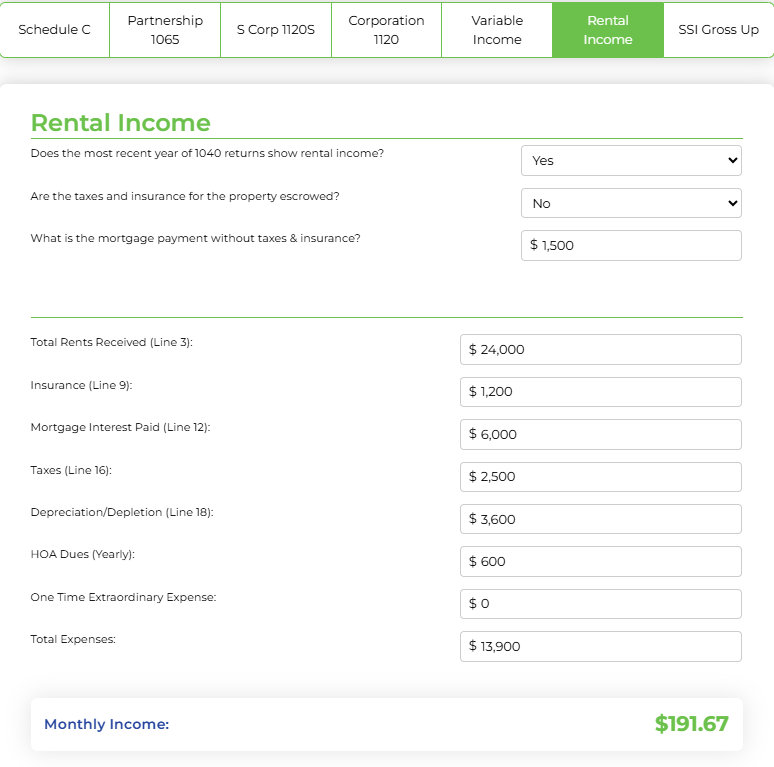
Break down borrower income across pay types with speed and clarity.
This includes support for Schedule C, Variable Income, and Rental Income.
Use it when:
Prequalifying wage earners, self-employed borrowers, or mixed income types
You need to separate base pay, bonuses, overtime, and commissions
Structuring strong files that close faster
Take the guesswork out of closing costs with accurate tax math.
Use it when:
Buyers are closing mid-year and need tax breakdowns
Your Realtor partners want clean numbers for seller nets
You need to verify prorated amounts for disclosures
Handle VA buyers with multiple entitlements or remaining eligibility.
Use it when:
When a borrower does not have full entitlement on the COE
You need a fast way to estimate what’s possible for a veteran
Follow these steps to start using the built-in calculators inside LO Ninja:
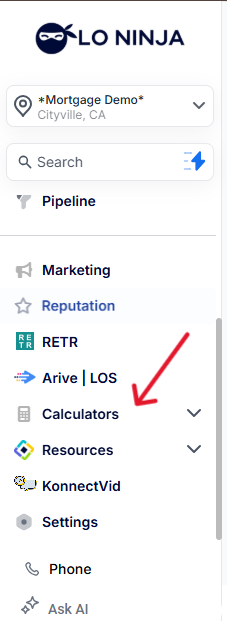
1. Navigate to the Calculators Tab
From your LO Ninja dashboard, click on “Calculators” in the left-hand menu.
2. Choose Your Tool
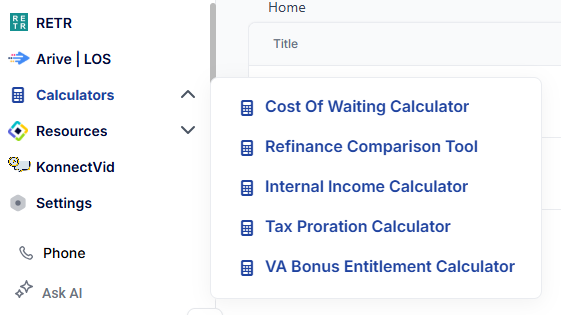
You’ll see a list of calculators, each clearly labeled:
Cost of Waiting Calculator
Refinance Comparison Tool
Income Calculator
Tax Proration Calculator
VA Bonus Entitlement Calculator
Click on the one that fits your current scenario.
3. Enter the Data
Each calculator has an easy-to-use form. Fill out the fields based on your borrower’s details or the scenario you’re working on.
4. Review the Results
You’ll get clear, instant results—no spreadsheets or guesswork.

5. Save or Share the Info
Use the output to guide borrower conversations, and support disclosures.
If a sharing option is available (like PDF or copyable values), you’ll see it near the result area.