
It’s easier than ever to tag contacts based on their email campaign interactions, right from the Campaign Statistics page. Whether someone opens an email or clicks a link, you can instantly segment them—no need for pre-planned workflows or bulk actions.
🚀 What’s New
Tag by Interaction:
Add tags to contacts who opened, clicked, etc.—right from the campaign statistics page.
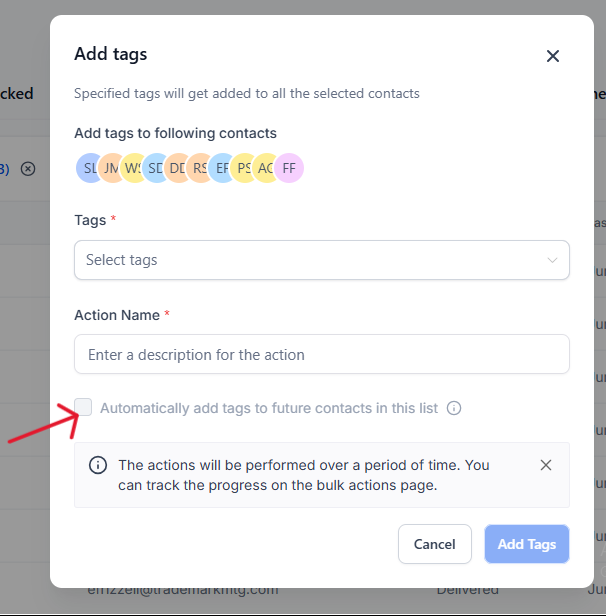
Auto-Tag Future Interactions: Select “All” to auto-tag future opens, clicks, etc.
Trackable Logs: See tagged contacts and logs right in the statistics page.
🎯Benefits
Instant segmentation for better personalization
Automated tagging as new contacts interact
Easy tracking in Tags & Bulk Actions
Multi-tagging supported for advanced targeting
👷♂How to Use
Go to Marketing → Email Campaigns
Open campaign statistics (3-dot menu on a sent campaign)
Click Load More → scroll to Opened, Clicked, etc.
Select contacts, click on Add Tags
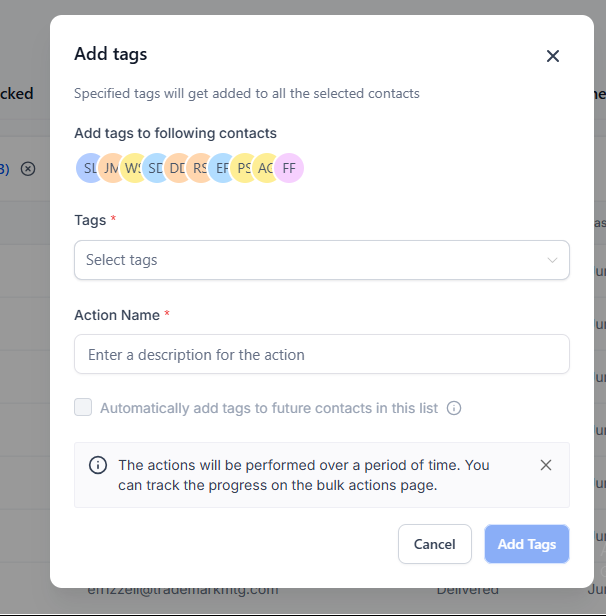
To auto-tag future contacts: Select All → Add Tags → Enable Auto-Tagging
💡Notes
You can track tagging in the Tags and Bulk Actions sections
Future Auto-tagging not available for Skipped
All actions are logged under Bulk Actions, except future auto-tagging
To enable future auto tagging, select all contacts