You can now filter your opportunities by referral source directly from the Pipeline view and even customize how this filter appears in your search bar.
🔍 What You Can Do
Filter opportunities by referral/source using the Opportunity Source filter in the Pipeline.
You can customize your pipeline cards to display the referral source for quick visibility.
Search by source name using the search bar after enabling it in your settings.
🛠 How to Enable Opportunity Source in the Search Bar
🔒 Admin Only:
Search field customizations apply globally and are only available to admins. Regular users cannot modify these search settings.
To enable filtering by opportunity source from the global search bar:
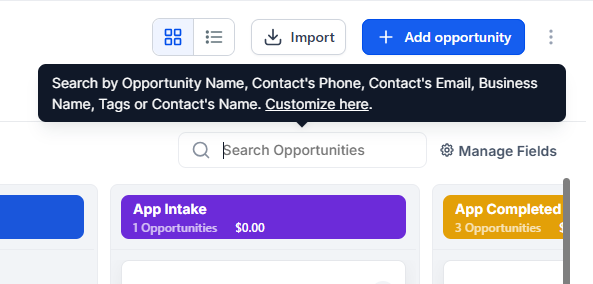
In the Pipeline view, click the ‘Customize here’ link next to the search bar.
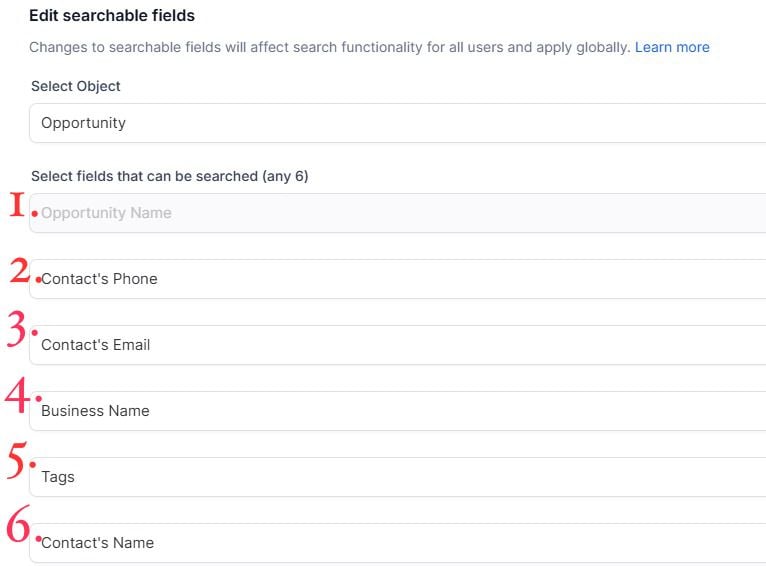
Go to the ‘Edit Searchable Fields’ tab and Select Opportunity Source (and any other fields you'd like)
Click Confirm to save your changes.