
Frequently Asked Questions
How Does LO Ninja Handle Contacts and Prevent Duplicates?
LO Ninja identifies contacts by matching either the email OR phone number with ARIVE. If a match is found, the system merges the information automatically; if neither matches, a new contact will be created. Each contact—main borrower, co-borrower, buyer, or seller agent—needs at least one unique identifier (email or phone number) and is linked to the deal via the ARIVE Loan ID.
Will my phone application show up in LO Ninja?
**REQUIRED STEP**
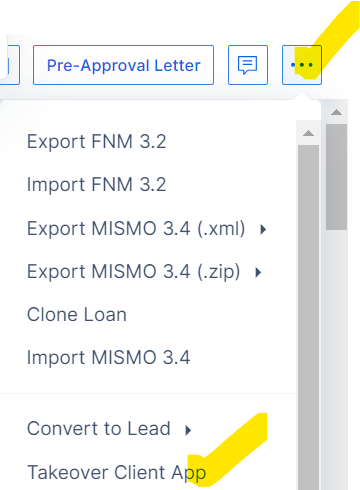
If you complete a phone app in ARIVE, it will sync with LO Ninja. Just be sure to click “Takeover Client App” in ARIVE to mark it as submitted — that’s what pushes the data over.
What if my co-borrower shares an email with the main borrower?
The co-borrower needs their own phone number OR email to be added as a contact.
Does all ARIVE data sync to LO Ninja?
All important loan data syncs back to LO Ninja, but some fields like FICO and year of birth don’t sync due to ARIVE’s compliance policy. You’ll need to manually enter these in LO Ninja. The day of birth does sync properly, allowing for automatic birthday messages to still send properly regardless of birth year.
What if I forgot to update my client stages?
No worries if you missed a stage update! Just move the client directly to their current stage in ARIVE. For example, if Lucy is at "Clear to Close" (CTC), skip the in-between stages and update her straight to CTC to avoid extra updates.