
The Calendar Dashboard gives you a crystal-clear view of your schedule, showing appointments, follow-ups, and reminders in one clean interface.
In this video, you’ll see how to use the calendar to manage your day, coordinate with leads and partners. You’ll also get a quick look at how confirmed appointments flow in automatically from your workflows and forms.
Whether you’re juggling Zoom calls, phone consults, or in-person meetings — this is where it all stays organized. One minute here keeps your whole week on track.
How to Share Your Calendar Link
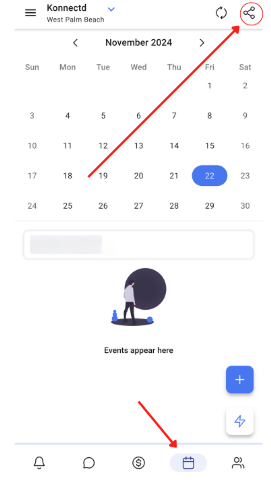
Go to the calendar tab in the mobile app.
Tap the share icon in the top-right corner and select the calendar or group to share.
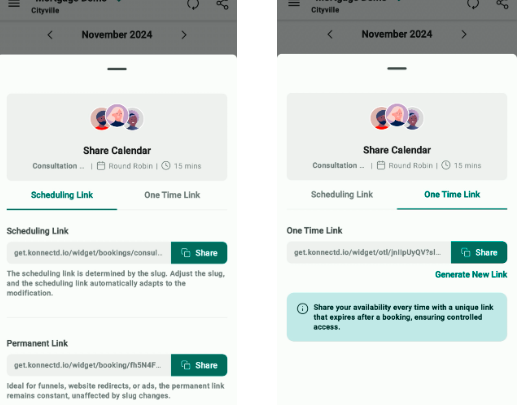
Choose a Scheduling Link for client bookings or a One-Time Link for individual leads.Example Use:
Send a scheduling link to let new leads book a consultation hassle-free.
Share a one-time link for VIP clients to give them exclusive access.
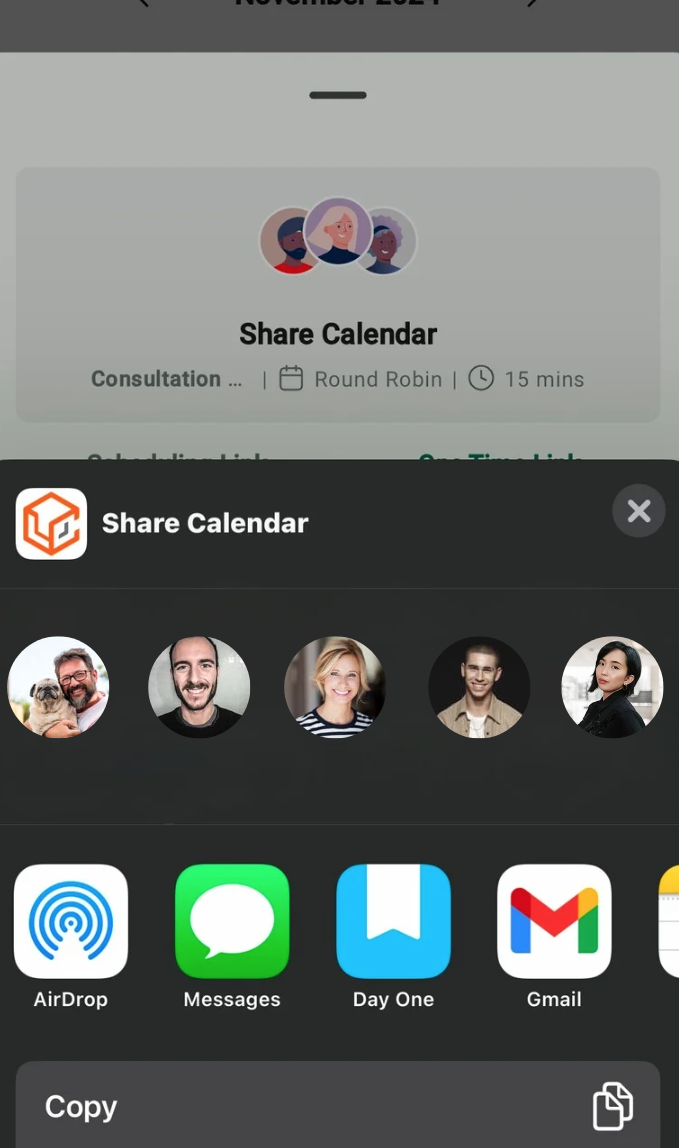
Copy or share the link directly through your preferred platform.
Pro Tips:
Add a clear note like "Click to book!" when sharing links.
Test links first to make sure they work.
Save time—reuse permanent links for newsletters or promos!